9 February 2023 · 8 min read
Generating Words from a Regular Expression Without a Regex Library
A university automata theory assignment solved in Java: build a DFA from a regular expression and use it to generate and check words, with no regex library.
This post is about an assignment from last semester's Automata Theory course (also called Computer Theory), and how I solved it.
What is a regular expression?
Before the assignment itself, it helps to know what a regex is. A regular expression can be defined as a string or language accepted by a finite automaton. An example explains it better than the definition.
Say you want the user to enter a string in a certain format. Checking an e-mail address is a good test case. How do you check that an address is valid? It must contain exactly one @, and the @ can't be at the start or the end. It can't have capital letters. It can only contain the digits 1-9 and the letters a-z. There may be many more rules. You can write all of that by hand, but it is a lot of work. Others ran into the same problem before us and came up with regular expressions.
For more detail, read this tutorial and watch the video below.
Regex tutorial: https://medium.com/factory-mind/regex-tutorial-a-simple-cheatsheet-by-examples-649dc1c3f285
Video: Regular Expressions - Computerphile
The assignment
Here is the question as it was given (translated):
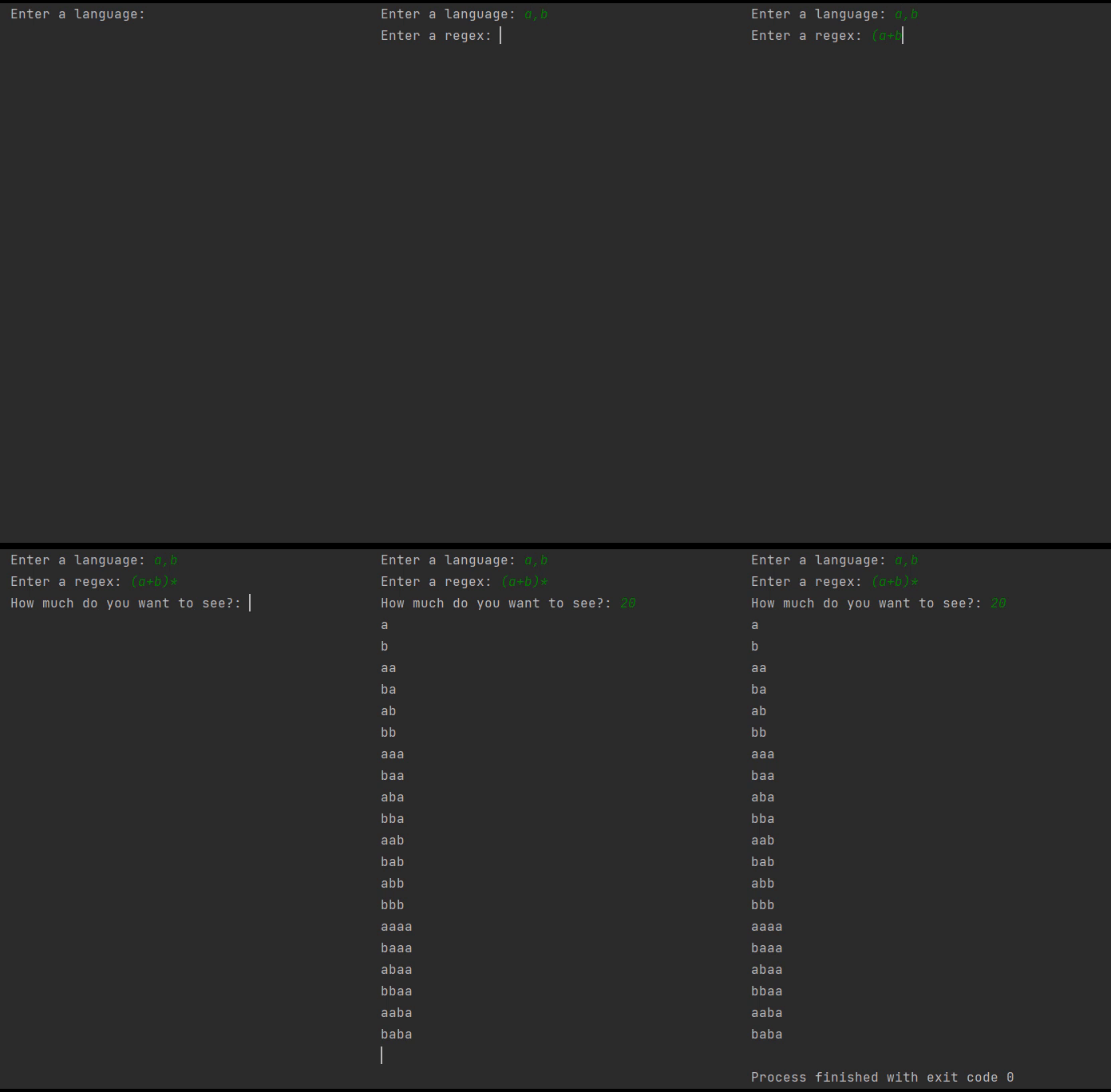
Write a program that takes the alphabet from the user as S={a,b} (comma separated),

lets the user enter the regular expression,

can produce the language L of words, and prints as many words as the user asks for.

Note: The program must check that the regular expression can be produced from the alphabet!

Note: Assignments that can also check whether a given word belongs to the language L get a bonus!

Example:

Enter the alphabet S={a,b}
Enter the regular expression: (a+b)*a
How many words of L do you want to see? : 3

The regular expression can be produced from the alphabet S. Listing your words..

L={a,aa,ba}

BONUS: Enter the word to check: b
OUTPUT: This word does not belong to the language L.

NOTE: Using a regex library is forbidden.
A magic trick looks impressive until you hear the secret behind it. This problem is similar. Once you see the solution it doesn't look very hard, and the part worth having is the time it takes to get there (for me at least).
The question was given in week 4, the lecture on regular expressions. I don't think you can solve it with regex alone. If you are weak on DFAs (deterministic finite automata) and NFAs (nondeterministic finite automata), look at those first. I was surprised when I first saw the question and spent hours thinking about it. How do you generate words that match a regular expression? The words go on forever, so you must not repeat what you already produced. Do you keep the produced words in a list? How do you check that the words are right? I spent a week researching regex, DFAs, NFAs and automata. I watched compiler design lectures, went through more GitHub repos than I can count and read most of the Stack Overflow posts on the subject.
Try to solve it yourself before reading the solution. If you manage, congratulations. If you don't, you will learn something new from the solution anyway.
Going through the question
Enter the regular expression: (a+b)*a
How many words of L do you want to see? : 3
In this post + means "or". It can mean different things in different texts, so I want to be clear about it.
The key part of the solution is an algorithm that generates words matching the regular expression.
How does this relate to automata?
Take the regular expression (a+b)*. Some words it produces: a, b, aa, ab, ba, bb, aaa, aab, aba, abb, baa, bab and so on.
Now the reverse. How do we know whether the word aab fits (a+b)*? If we build the automaton of (a+b)*, we can check aab against it. The regexes you see online work on this logic. Put simply (details later), the automaton of the regex you enter is built, and the given word is tested on that automaton. With the FSM Simulator you can build the DFA, NFA or e-NFA of any regex and watch your string being checked against the finite automaton step by step.
That means we have already solved the bonus part. The program has to build the automaton of the given regular expression. Then:
BONUS: Enter the word to check: b <ENTER>
We enter the word and check on the automaton whether it matches the regular expression, exactly like on the FSM Simulator site above. So the small bonus question hands us a trick for the main solution. We will see how later.
But the question asks us to generate words
Step by step. So far we can only test whether a given string fits a regex. Two more things need sorting out. The first is what a regular expression is for.
Back to the e-mail example. There we test whether a given address follows the rules. A regex only tests. Generating words that follow the rules is a different job. So how do we generate words? Not hard. We generate arbitrary words from the given alphabet and test each one against the regex. We store the ones that match and show them to the user. That is the point the question wants us to understand. A regex stores nothing in memory and generates no words. As with finite automata, it only checks whether a word reaches the final state.
Generating all word combinations from the alphabet
An example to make the job clearer:
Enter the alphabet:

S={ a,b }
L={a,aa,ba}
<ENTER>
We need to generate words from the alphabet. In the example the generated words are accepted starting from the shortest length. So we need code that produces all combinations of the alphabet, shortest first. For the alphabet {a,b} that is a, b, aa, ab, ba, bb, aaa, aab, aba, baa, bab, bbb and so on. We test each one and keep the ones that match the regex.
We do this with the idea of a base-n number system, where n is the length of the alphabet. Let 0 stand for the letter a and 1 for the letter b. Starting from 0, convert every positive integer to base n. Here the alphabet is {a,b}, so n = 2.
0 in base 2 -> 0 (a)
1 in base 2 -> 1 (b)
2 in base 2 -> 10 (ba)
3 in base 2 -> 11 (bb)
4 in base 2 -> 100 (baa)
5 in base 2 -> 101 (bab)
We get some of the combinations this way. Look closely at the combinations of length 2 (ba and bb). We also want aa and ab. They are missing because leading zeros have no value and are not written. In binary we write 5 as 101, not 0101. To produce all combinations correctly, we add an empty word to the alphabet, which stands in for the worthless leading 0. For {a,b} we convert the alphabet to the string ^ab. Then we generate all combinations with the method above. This produces extra combinations, but every combination we want is now included: aa, ab, ba, bb. Afterwards we drop the combinations that contain the empty word, because we only need the others. This way all combinations of the alphabet can be produced.
The Java code below takes an alphabet (for example ^ab) and a number (for example 10) and finds the number's representation in base n. Instead of a number like 1010, it puts the alphabet letters that stand for 1 and 0 directly (alfabe.charAt(sayi % alfabeLen)). If the number is a combination containing the empty word, it returns an empty string. Otherwise it returns the generated word. Sending in every number in turn produces every combination.
private static String toWord(int sayi,String alfabe){
    int alfabeLen = alfabe.length();
    String word = "";
    while(sayi > 0){
        word = word + alfabe.charAt(sayi % alfabeLen);
        sayi /= alfabeLen;
    }
    return word.contains("^") ? "" : word;
}
Regular expression to NFA to DFA
We are at the last stage. All that is left is to build the automaton of the given regular expression, so we can check whether a string matches it. How do we do this without a regex library? We convert the regex to a DFA. Then we test a string by checking whether it ends in a final state of the DFA. To understand the concept, first watch this video:
FirstPOS, LastPOS, FollowPOS : RE to DFA
For this part I translated and adapted material from github/alirezakay/regexToDfa and geeksforgeeks/regexToDfa. The originals are at those links. To see how compilers are built, you can also watch the Compiler Design playlist on YouTube. It explains the stages compilers go through and the methods they use.
Example: (a|b)*abb
The | sign also means + and "or".
Add a
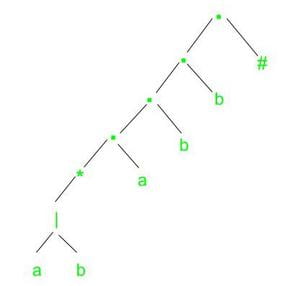
#sign to the end of the regex. It tells us whether we have reached the end, the final state.Build the syntax tree. Here is the tree for this example:
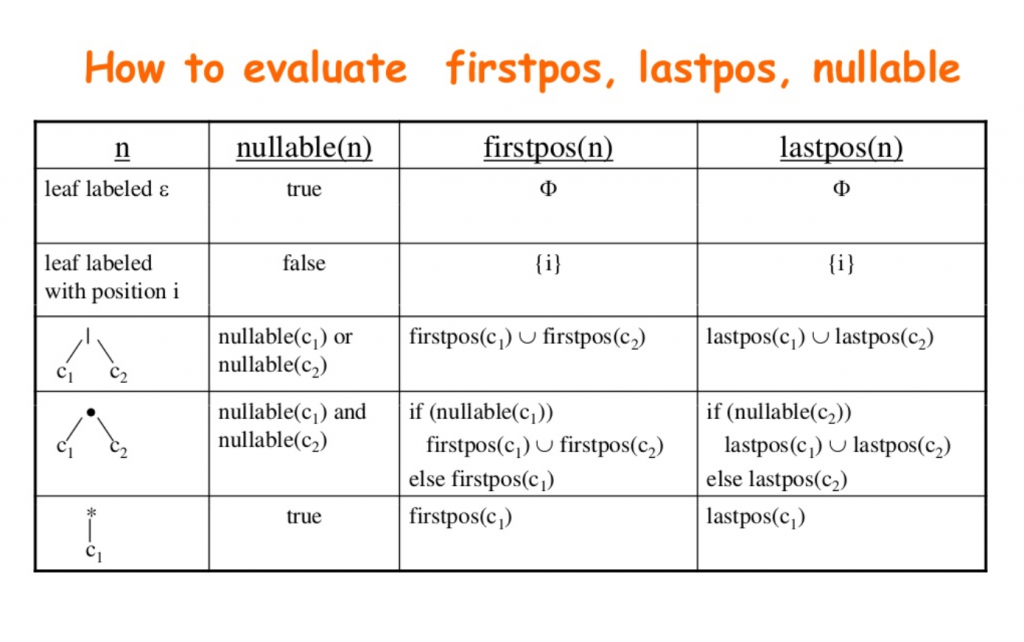
- Compute nullable, firstpos, lastpos and followpos for the tree. The video above shows how. We use the rules below to compute these four values.
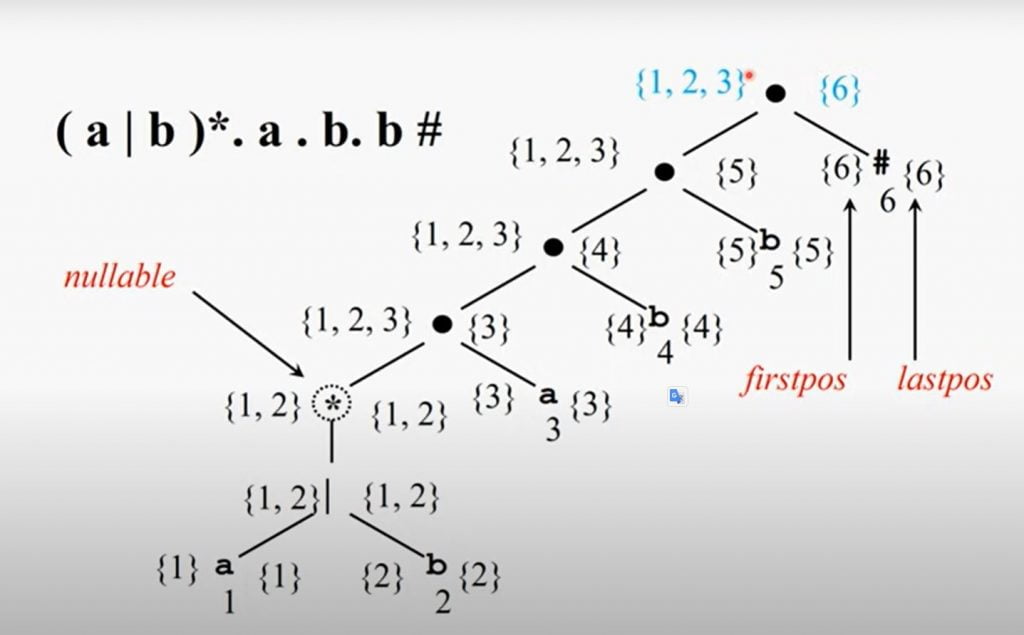
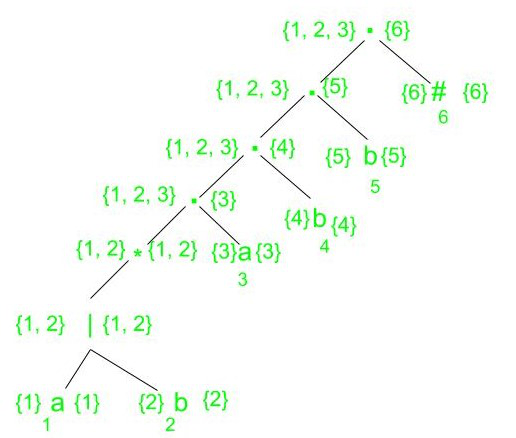
- The syntax tree of (a|b)*abb with firstpos and lastpos computed is in the image below. The video explains how they are computed, and the rules are above.
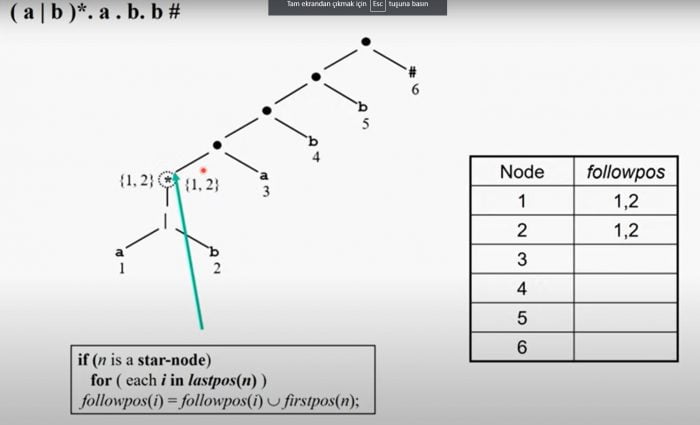
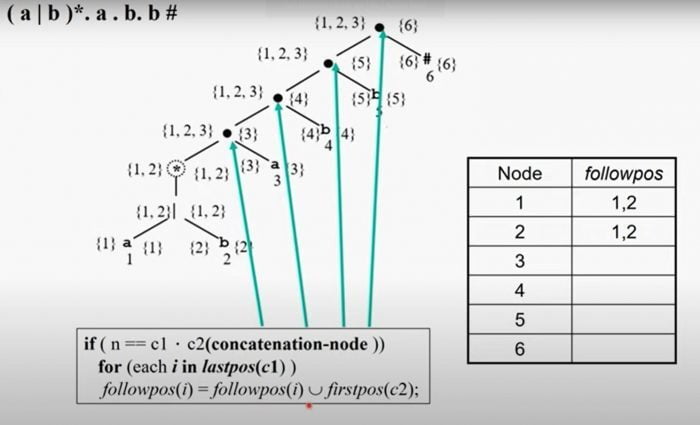
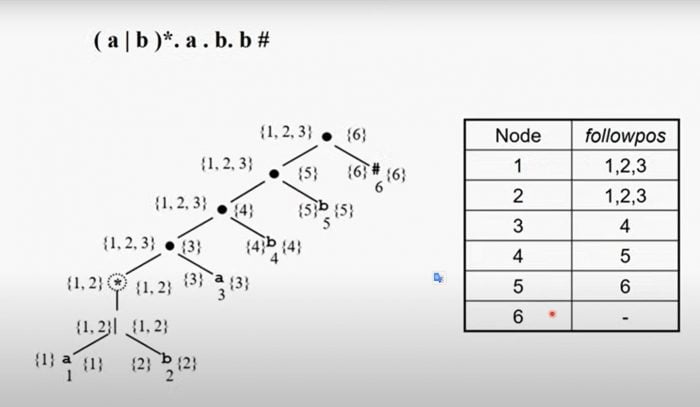
- Now compute followpos for the tree, going from the bottom up.
- Finally, build the automaton starting from the root of the tree. We work out, step by step, which state each state goes to on
aand onb. We start at the root node {1,2,3}. We have to group nodes 1, 2 and 3 by the letter they carry. Nodes 1 and 3 carrya, so we merge the followpos of nodes 1 and 3. Node 2 carriesband no other node does, so it only stands for its own followpos.
First merge the followpos of nodes 1 and 3. 1 = {1,2,3}, 3 = {4}, 1 ∪ 3 = {1,2,3,4}. The union of 1 and 3 is a new state, so we add it to the state table. So {1,2,3} goes to {1,2,3,4} on a.
Now node 2. 2 = {1,2,3}, 2 ∪ 2 = {1,2,3}. {1,2,3} is already in the state table, so {1,2,3} goes to itself on b.
6.1. Next up is state {1,2,3,4}. We group its nodes again. 1 and 3 carry a, 2 and 4 carry b.
We already merged 1 and 3: 1 ∪ 3 = {1,2,3,4}. So state {1,2,3,4} goes back to itself on a.
Now merge 2 and 4. 2 = {1,2,3}, 4 = {5}, 2 ∪ 4 = {1,2,3,5}. This new state is not in the table yet, so we add it. State {1,2,3,4} goes to {1,2,3,5} on b.
We keep filling in the table this way until every state is done. Giving the states names makes the table easier to write down, so do that if you like.
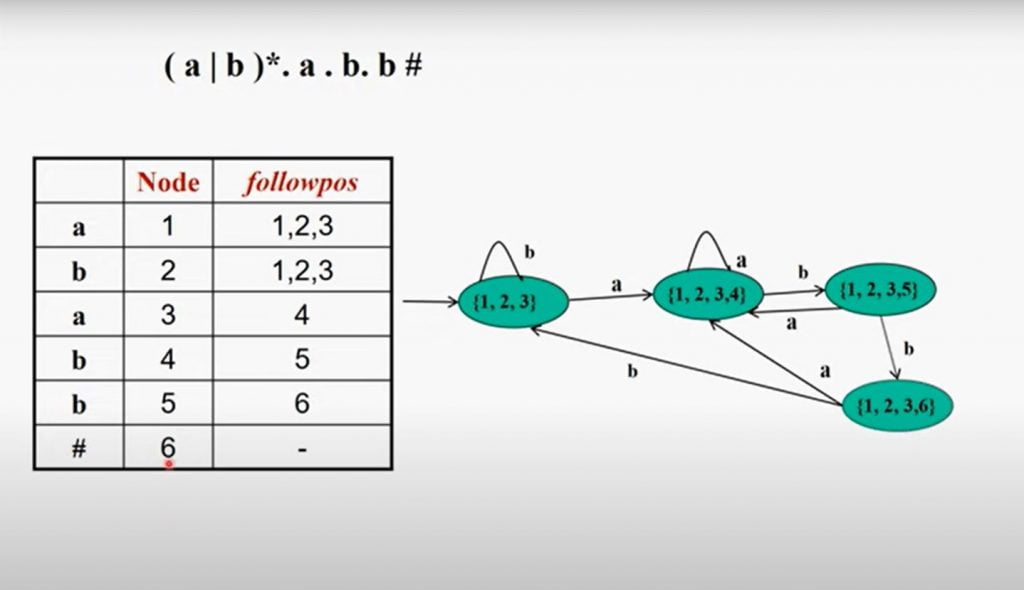
The final states are all states that contain the # sign, so {1,2,3,6} in the image is a final state. We now have every state and the DFA for the regex. From here we can run strings through the automaton and check whether they match.
The code is on GitHub: https://github.com/nurullahturkoglu/generate-strings-from-regex